


Waiting for “done”
You start an agent, switch to another, then keep peeking back to see if it finished.
The Mac interface built for the AI era
Three VS Code windows, five terminal tabs — ⌘-Tab can't tell you which agent just finished or which one is waiting for your input. Philote opens every app up into one card per project, and one click takes you to that exact window.
No install, no sign-up — right on this page
Skip and look around ↓⌘-Tab shows one VS Code — not what's inside
Why I built it
I run several AI agents at once, every day. I'd hand one a task, switch to another window — and then have no idea which one had finished. So I'd cycle through ⌘-Tab and the Dock, opening windows one by one.
I was spending longer finding the right window than answering the agent inside it. So I built this board, for myself.
I hope it takes a little of that friction out of your day, too.
— Jongseok Kim, maker of Philote
Before Philote
Swipe through desktops (⌃→), spread them out (⌃↑), pick the app (⌘⇥), flip through its windows (⌘`). Every time an agent finishes, you walk that path again.
You start an agent, switch to another, then keep peeking back to see if it finished.
Twelve windows, three terminals, two editors. Finding the one that's waiting takes longer than answering it.
Agents do the work, but you still open the code to look — which means finding the right window again.
So we built one board
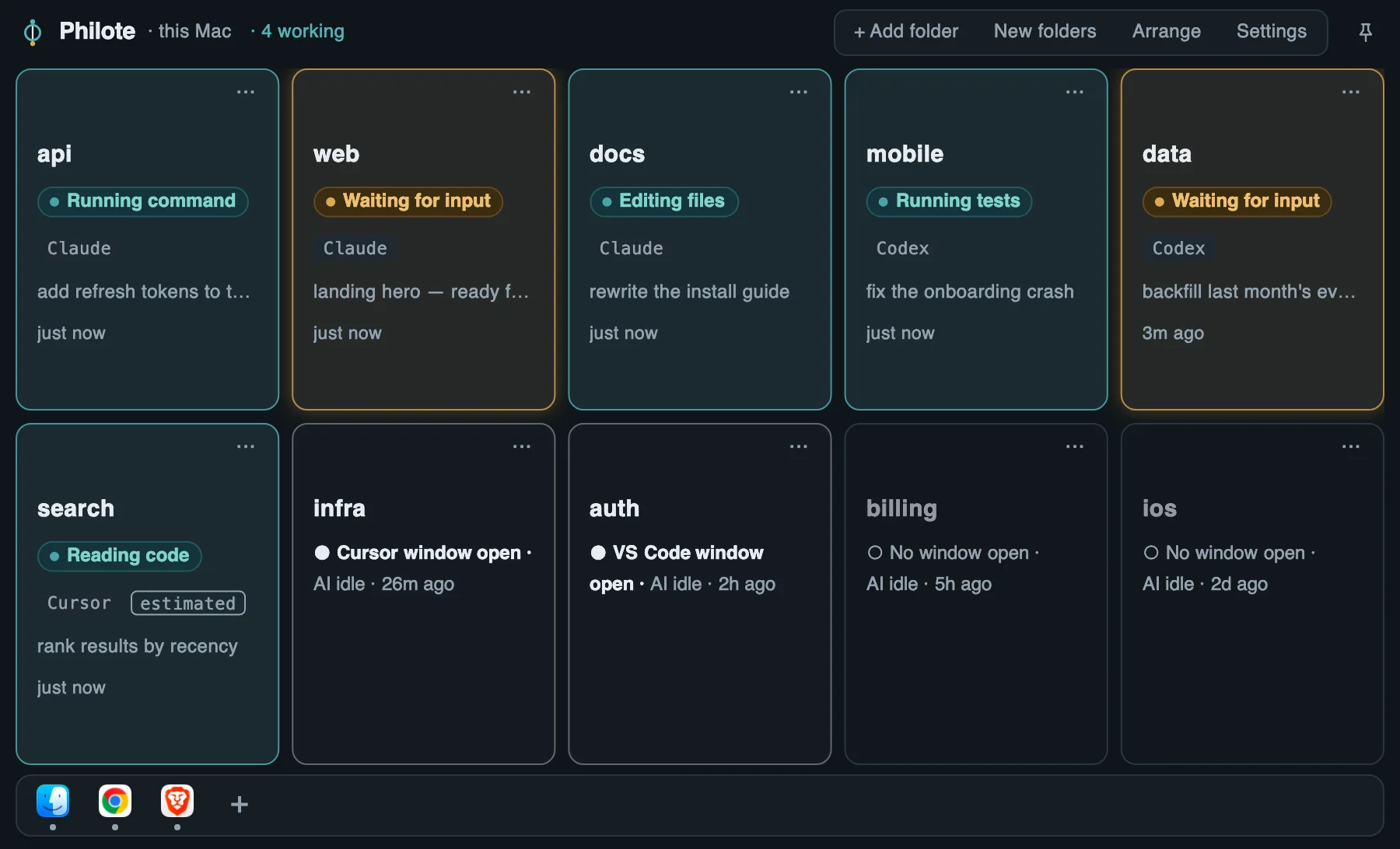
This is the real board — the one Philote opens over whatever you're doing. Every Claude Code and Codex session on your Mac, one card per project.
Live state
Working, waiting for input, or idle — for every Claude Code and Codex session, the moment it changes. The one that needs you glows.
Windows
Each idle project shows whether its VS Code or Cursor window is open. Tap any card: the exact window, Terminal or iTerm2 tab comes forward.
Log
Every turn leaves one line: what you asked, what the agent answered, which files changed — next to the commits. Open a project's log from its card.
From anywhere
Press ⌃⇧Space over whatever you're doing. The board appears where you left it, then gets out of the way when you've jumped. Pin it to keep it on screen.
Why “Philote”
The name comes from the philote, a particle in the “Ender’s Game” novels. In the books, it’s the smallest particle there is — linked to every other, so a signal crosses any distance at once. Your Mac is a small universe of agents scattered across folders and windows. Philote is the thread through all of them.
φ = 0 + 1
The ring is 0 — the empty field between your agents. The thread is 1 — the link that runs through it. Say it FY-loht.
Philote is made by 0+1 · ZERO PLUS ONE Inc.
Entanglement
When a new Claude Code session opens, it starts with a short note of what other agents just did in that folder — first lines and file names, nothing more. You can turn it off.
A closed universe
Your prompts, answers, code and project names stay on this Mac. The trial needs no sign-up. Unless you turn on Philote Cloud later, all we exchange with our server is your sign-in email after you buy, your device name, checks for updates and notices, and anonymous counts of which features you use, with none of your work in them (you can turn those off in Settings). Philote reads what your AI tools already write and keeps its own history in one folder on your Mac — 30 days, 90 days, a year, or forever. The short handoff note it passes to Claude Code goes to Anthropic with that session, and you can turn it off.
Pricing
For Macs with Apple silicon (M1 or later)